
# Lottery Phase I
# Create Lottery Project
- Create a Lottery project and set-up
~/temp $ smile new Lottery
~/temp $ cd lottery
~/temp/lottery
~/temp/lottery $ sbt
$[Lottery] smile
Import project into eclipse and Import project into intelliJ
# Create Lottery Mongo
- Open Lottery.ksmile in Eclipse.
- Edit
Lottery.ksmileand insert the below content to create a LotteryMongo module
section lottery {
  mongo-module LotteryMongo at com.metastay.lotterymongo
}
- $smile
- In Eclipse refresh to see the
LotteryMonogo.kmongo - Edit
LotteryMongo.kmongoto add a collection.
    collection Lottery {
        property lotteryName:String
        property amount:Int
        property participantList:String*
        property winner:String?
        property open:Boolean
    }
- $compile
- Write test cases in
LotteryMongoTestSuite.scala
test("lottery", Tag("lottery")) {
    LotteryWriter().drop()
    val lotteryName = "KarnatakaLotto"
    val row = LotteryRow(lotteryName = lotteryName, amount = 20000, open = true)
    LotteryWriter().save(row);
    assert(LotteryQuery().count == 1)

    //Add Participant
    val q = LotteryQuery().lotteryName.is(lotteryName)
    val u = LotteryUpdate().participantList.addToSet("John")
    LotteryWriter().updateOne(q, u)
    assert(q.findOne.get.participantList.size == 1)

    //Remove Lottery
    //LotteryWriter().remove(q)
    //assert(LotteryQuery().count == 0)
}
- import com.metastay.lotterymongo.lottery._
- Run Test
- $project LotteryMongo
- $testOnly com.metastay.lotterymongo.LotteryMongoTestSuite -- -n lottery
- Show the tables in mongo viewer
# Create Lottery Play
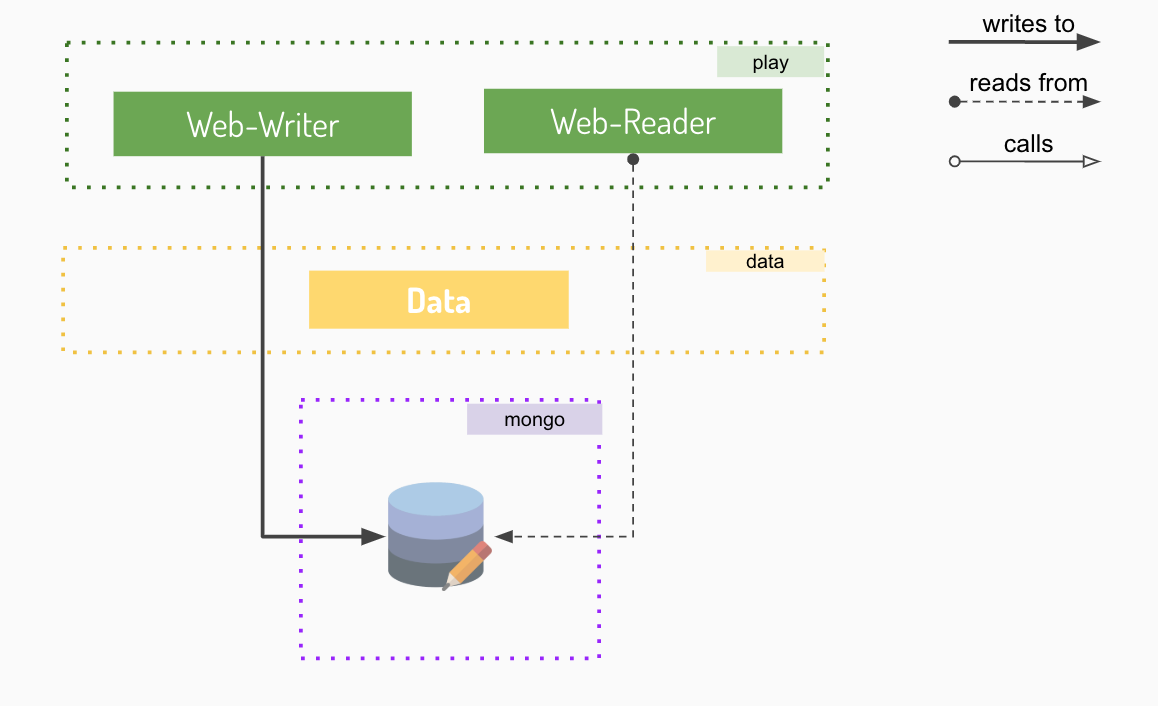
Building Lottery web-app, to see the list of lotteries, and adding play module to createLottery, addParticipant, runLottery.
.. _lottery-play-web-reader:
# Web Reader
First add a data module in Lottery.ksmile to hold data to represent Lottery details. LotteryPlay will use LotteryDetails data, so it depends on LotteryData
section lottery {
  data-module LotteryData at com.metastay.lottery
  mongo-module LotteryMongo at com.metastay.lotterymongo
  play-module LotteryPlay(LotteryData, LotteryMongo) at lotteryplay
}
- $smile
LotteryData.kdataadd a Lottery
data Lottery (lotteryName:String, amount:Int, participantList:String*, winner:String?, status:String)
- Change the route from lotteryplay to api in
LotterPlay.kplay
  module LotteryPlay (LotteryPlay)
  route "api"
- add web-reader to
LotteryPlay.kplay
web-reader Lottery {
  view lotteryList (GET){
      output(LotteryData::Lottery*)
  }
  view lotteryDetails (GET){
      input(lotteryName:String)
      output(LotteryData::Lottery)
  }
}
- $compile
- Implement
LotteryWebReaderCode.lotteryList
import com.metastay.lottery.data.Lottery
import com.metastay.lotterymongo.lottery.LotteryQuery

@Singleton
class LotteryWebReaderCode @Inject()(cc: ControllerComponents) extends LotteryWebReaderTrait(cc) {


  override def lotteryList: Request[LotteryListView.Pre] => List[Lottery] = LotteryListView{
  import LotteryListView._
  request: Request[Input] =>
    LotteryQuery().find.map(
      row =>
        new Lottery(
          lotteryName = row.lotteryName,
          amount = row.amount,
          participantList =  row.participantList,
          status = if(row.open)  "OPEN" else "CLOSED",
          winner = row.winner
        )
    )
  }

  override def lotteryDetails: Request[LotteryDetailsView.Pre] => Lottery = LotteryDetailsView{
    import LotteryDetailsView._
    request: Request[Input] => val input = request.body
      val row = LotteryQuery().lotteryName.is(input.lotteryName).findOne.get
      new Lottery(
        lotteryName = row.lotteryName,
        amount = row.amount,
        participantList =  row.participantList,
        status = if (row.open) "OPEN" else "CLOSED",
        winner = row.winner
      )
  }
}
- $run
- Test through url in browser http://localhost:9000/api/lottery/lottery-list
# Web Writer
Create lottery passing parameters like name and amount
Add Participant to a lottery by passing the participantName and lottery name to which the participant will be added to.
Run lottery which will pick a winner amoung the participant and close the lottery.
Adding createLottery, addParticipant, run POST calls with an url "api" to
LotteryPlay.kplay
module LotteryPlay (LotteryPlay)
route "api"

web-writer Lottery {
  action createLottery(POST) {
      input(lotteryName: String, amount: Int)
  }

  action addParticipant(POST) {
      input(lotteryName: String, participantName:String)
  }

  action run(POST) {
      input(lotteryName: String)
  }
}
- $compile
- Implement the code to
LotteryWebWriterCode.scala
import com.metastay.lotterymongo.lottery._

@Singleton
class LotteryWebWriterCode @Inject()(cc: ControllerComponents) extends LotteryWebWriterTrait(cc) {

    override def createLottery: Request[CreateLotteryAction.Pre] => Result = CreateLotteryAction{
      import CreateLotteryAction._
      request: Request[Input] =>
        val input = request.body;
        LotteryWriter().save(LotteryRow(lotteryName = input.lotteryName, amount = input.amount, open = true))
        Ok(s"${input.lotteryName} Lottery Created")
    }

    override def addParticipant: Request[AddParticipantAction.Pre] => Result = AddParticipantAction{
      import AddParticipantAction._;
      request: Request[Input] =>
        val input = request.body;
        val q = LotteryQuery().lotteryName.is(input.lotteryName)
        val u = LotteryUpdate().participantList.addToSet(input.participantName)
        LotteryWriter().updateOne(q, u)
        Ok(s"${input.participantName} has been added to ${input.lotteryName}")
    }

    override def run: Request[RunAction.Pre] => Result = RunAction{
      import RunAction._
      request: Request[Input] =>
        val input = request.body;
        val q = LotteryQuery().lotteryName.is(input.lotteryName)
        val participantList = q.findOne.get.participantList //To find the participantList
        val winnerIndex = scala.util.Random.nextInt(participantList.size) //To find a winner Index
        val winner = participantList(winnerIndex)
        val u = LotteryUpdate().winner.set(Some(winner)).open.set(false)
        LotteryWriter().updateOne(q, u)
        Ok(s"${winner} has won ${input.lotteryName} Lottery")
    }
}
- test through curl
- curl -H "Content-Type: application/json" -X POST -d '{"lotteryName":"Loto","amount":1000}' http://localhost:9000/api/lottery/create-lottery
- curl -H "Content-Type: application/json" -X POST -d '{"lotteryName":"Loto","participantName":"John"}' http://localhost:9000/api/lottery/add-participant
- curl -H "Content-Type: application/json" -X POST -d '{"lotteryName":"Loto","participantName":"Jim"}' http://localhost:9000/api/lottery/add-participant
- curl -H "Content-Type: application/json" -X POST -d '{"lotteryName":"Loto","participantName":"Joe"}' http://localhost:9000/api/lottery/add-participant
- curl -H "Content-Type: application/json" -X POST -d '{"lotteryName":"Loto"}' http://localhost:9000/api/lottery/run
- or Test through Postman
# Rest Api
Expose rest API through Swagger
- Add swagger to
LotteryPlay.kplay
swagger api {
  writer LotteryPlay::Lottery
  reader LotteryPlay::Lottery
}
- Inside sbt shell, add-swagger and run
$[Lottery]add-swagger
$[Lottery]run
- Test through swagger by browsing http://localhost:9000/swagger and explore api